Snippet Library
Save, organize, export, and re-run your favorite expressions, diagnostic routines, and database queries inside the console.
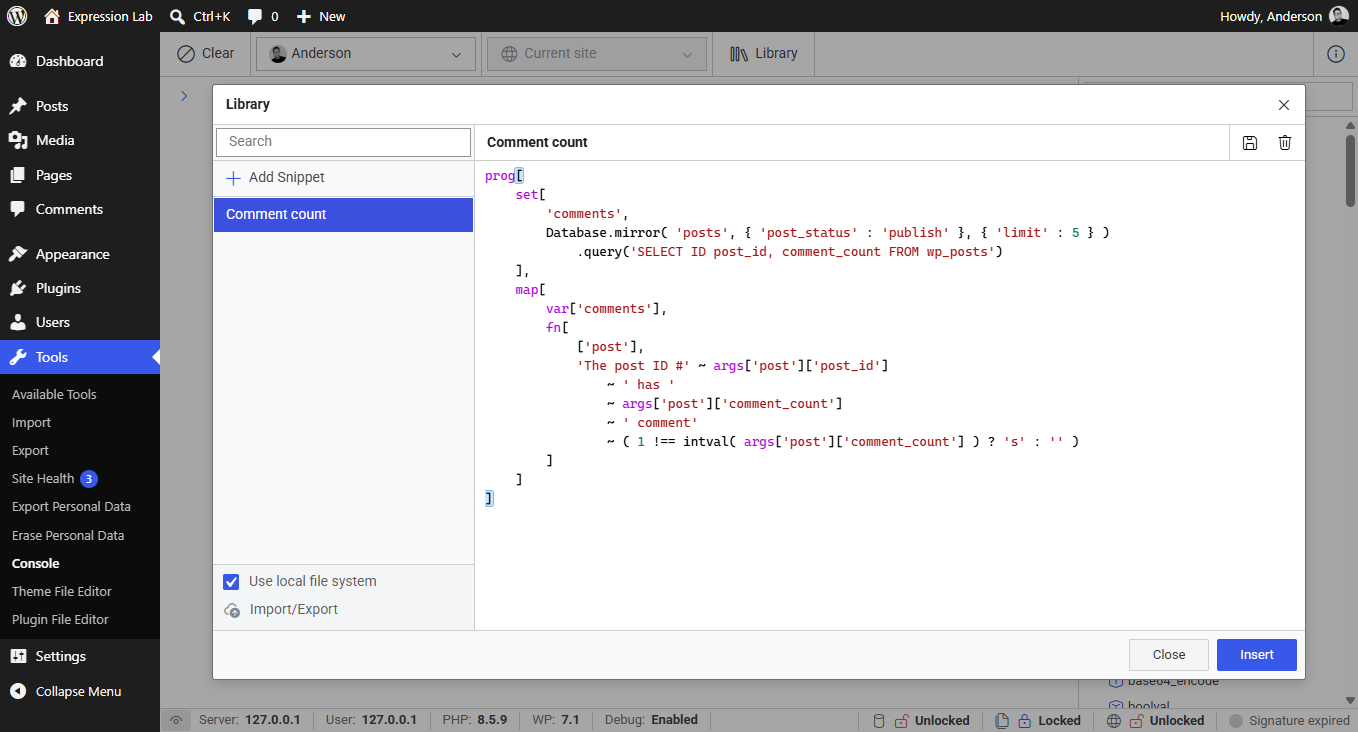
The Snippet Library modal contains the following key components:
Snippet List & Search
- Search Bar: Quickly filter your saved snippets by title.
+ Add SnippetButton: Creates a new blank snippet ready for editing.- Snippet Navigation: Click any snippet in the list to load its title and code into the editor.
Snippet Editor
- Title Field: Give your snippet a descriptive name (e.g.,
Users (Database raw),Option distribution). - Code Editor: Write multiline DSL expressions with full syntax highlighting.
- Save (
Floppy Disk): Commits changes to the selected snippet. - Delete (
Trash): Permanently removes the selected snippet from storage.
Action Buttons
- Insert: Injects the snippet code into the active console prompt at the bottom of the screen.
- Close: Dismisses the modal without modifying the current editor prompt.
Storage Modes
Expression Lab supports two flexible storage strategies for snippet persistence:
In-Browser Storage (Default)
By default, snippets are stored locally in the browser's persistent storage (IndexedDB / LocalStorage). This allows instant access without requiring any special browser permissions or file configurations.
Local File System Storage
Checking the Use local file system box enables direct synchronization with a folder on your local computer using the browser's native File System Access API:
- Version Control: Save your snippets inside a local Git repository.
- Cross-Browser Sharing: Share snippet collections across multiple browsers and local development setups.
- Persistence: Preserve snippets across browser cache clears or private browsing sessions.
The File System Access API is supported in modern Chromium-based browsers (Chrome, Edge, Brave, Opera) over secure contexts (HTTPS or localhost). If unsupported, Expression Lab gracefully defaults to browser storage.
Importing & Exporting Snippets
Click the Import/Export button at the bottom-left of the modal to manage snippet backups:
- Export: Downloads your entire snippet catalog as a clean
.jsonbundle. - Import: Loads snippet JSON files, merging or restoring snippets into your workspace.
This makes it easy to distribute team standard diagnostics, onboarding queries, and site maintenance scripts across WordPress environments.