Snippet Library
Save, organize, export, and re-run your favorite expressions, diagnostic routines, and database queries inside the console.
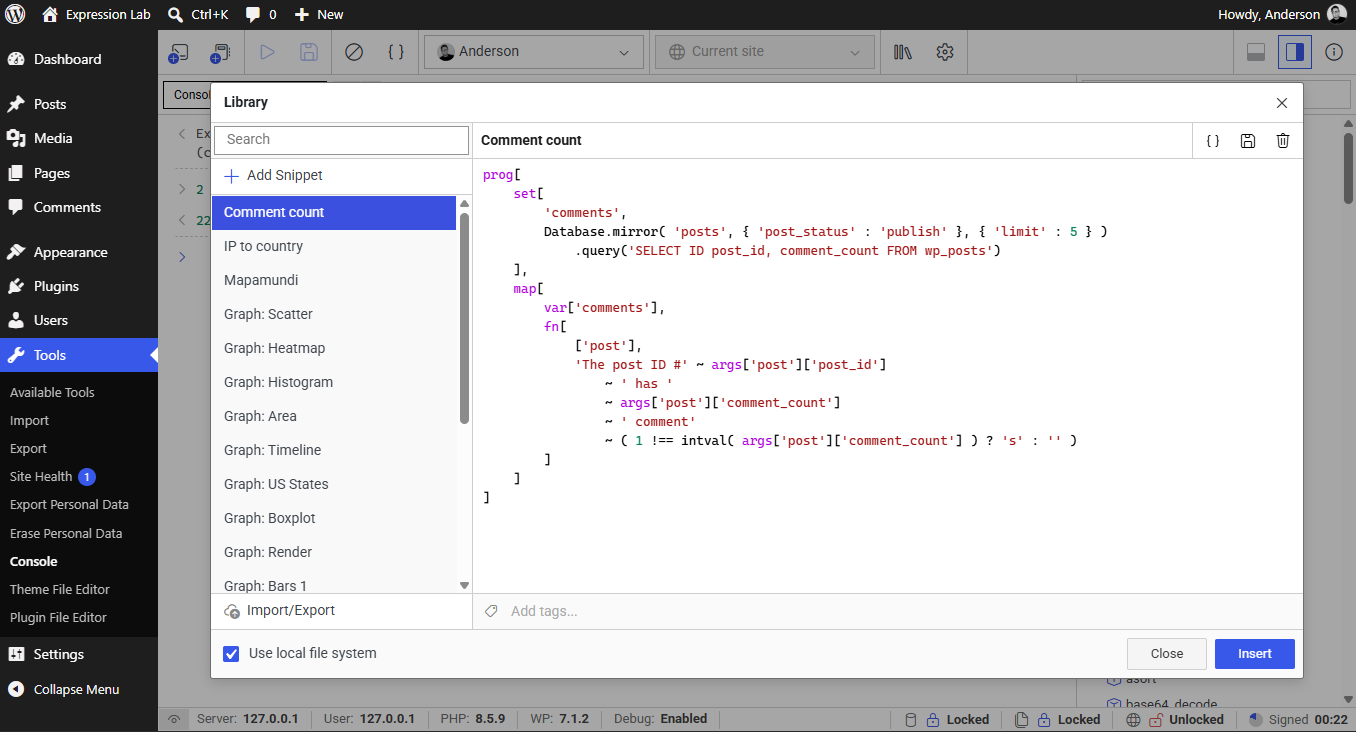
The Snippet Library modal contains the following key components:
Snippet List & Search
- Search Bar: Quickly filter saved snippets by title or tags in real-time. Supports free-text search as well as explicit tag filters using
tag:<name>(e.g.,tag:databaseortag:[my tag]). + Add SnippetButton: Creates a new blank snippet ready for editing.- Snippet Navigation: Click any snippet in the list to load its title, code, and tags into the editor.
Snippet Editor
- Title Field: Give your snippet a descriptive name (e.g.,
Users (Database raw),Option distribution). - Code Editor: Write multiline DSL expressions with full syntax highlighting.
- Tags Input: Assign custom tags to organize snippets into topics (e.g.,
posts,database,diagnostics). Displays existing tag suggestions, allows adding tags with Enter or comma, and lets you remove tags by clicking their delete icon. - Format Code (
{}): Beautifies and formats the snippet code in the editor with consistent indentation. - Save (
Floppy Disk): Commits changes to the selected snippet. - Delete (
Trash): Permanently removes the selected snippet from storage.
Action Buttons
- Insert: Injects the snippet code into the active console prompt or scratchpad editor.
- Close: Dismisses the modal without modifying the current editor buffer.
Storage Modes
Expression Lab supports two flexible storage strategies for snippet persistence:
In-Browser Storage (Default)
By default, snippets are stored locally in the browser's persistent storage (IndexedDB / LocalStorage). This allows instant access without requiring any special browser permissions or file configurations.
Local File System Storage
Checking the Use local file system box enables direct synchronization with a folder on your local computer using the browser's native File System Access API:
- Version Control: Save your snippets inside a local Git repository.
- Cross-Browser Sharing: Share snippet collections across multiple browsers and local development setups.
- Persistence: Preserve snippets across browser cache clears or private browsing sessions.
The File System Access API is supported in modern Chromium-based browsers (Chrome, Edge, Brave, Opera) over secure contexts (HTTPS or localhost). If unsupported, Expression Lab gracefully defaults to browser storage.
Importing & Exporting Snippets
Click the Import/Export button at the bottom-left of the modal to manage snippet backups:
- Export: Downloads your entire snippet catalog as a clean
.jsonbundle. - Import: Loads snippet JSON files, merging or restoring snippets into your workspace.
This makes it easy to distribute team standard diagnostics, onboarding queries, and site maintenance scripts across WordPress environments.