Database
Run analytical SQL queries, joins, and aggregations against WordPress tables by mirroring data into an ephemeral in-memory SQLite3 database, separating analytical queries from the active MySQL database.
The SQLite3 PHP extension must be installed and enabled on your server for the Database object to work. When SQLite3 is unavailable, Database.mirror() still stores results internally and fetch() retrieves them from history, but Database.query() will throw an exception.
Data Mirroring
Database.mirror()
Copies the records of a WordPress table into an in-memory, request-scoped SQLite database. This database is automatically discarded once the current expression finishes executing.
Database.mirror(
  string:table,
  array|object|null:where = [],
  array|object|null:options = null
): Database
Parameters
table(string, required): The name of the table to mirror without a prefix (e.g.,'posts','users','postmeta').where(array|object|null, optional): Filter conditions using recursive structures, comparison operators, or in-site joins. Default is[](mirrors the entire table up to buffer limits).options(array|object|null, optional): Configuration options for column selection, ordering, pagination limits, and prefixes. See Mirror Configuration Options.
Basic usage
Let's say you want to fetch all entries from the wp_posts table. You can use any of the following expressions:
Database.mirror('posts').fetch()
Database.mirror('posts').flush()
The fetch() and flush() chained methods retrieve the mirrored data and return it as an array of objects. The difference is that flush() frees the SQLite buffer (drops and reinitializes the in-memory database, clears query history) while fetch() retains the data in memory for further operations.
Table prefixes (such as wp_) are resolved automatically. On WordPress Multisite installations, Database.mirror automatically applies the current blog prefix (e.g., wp_2_) for site-specific tables and the base prefix (e.g., wp_) for global tables (users, usermeta, and any registered ms_global_tables).
You can override the prefix using the prefix option in the third parameter.
When mirroring a large table without specifying an explicit limit (e.g., Database.mirror('posts').fetch()), Expression Lab automatically caps the query to the available buffer limit (1,000 rows by default) and renders a warning notification in the Console.
This allows instant, exploratory sampling on large production tables (e.g. 50,000+ posts) without throwing memory safety exceptions. To retrieve a larger dataset, increase the buffer with Database.buffer(50000) or provide an explicit limit option.
Calling Database.mirror() multiple times on the same table (e.g. 'posts') replaces the in-memory SQLite table schema and rows with the latest query. It does not append rows or behave like a SQL UNION ALL.
- To query multiple types/statuses in a single table: Use a single
mirror()call with an$inoperator or anORarray (e.g.,{ post_type: { '$in': ['post', 'page'] } }). - To keep multiple independent snapshots of the same table: Use the
asoption to assign custom table names in SQLite (e.g.,{ as: 'my_posts' }and{ as: 'my_pages' }). - To combine different tables: Mirror distinct tables (e.g.,
posts,users,postmeta) to perform relationalJOINoperations across them inDatabase.query().
The WHERE Parameter Syntax
The where parameter in Database.mirror() supports an expressive, recursive filtering syntax based on Symfony Expression Language conventions. Conditions are compiled into parameterized MySQL queries ($wpdb->prepare) before mirroring data into SQLite.
Logical Grouping (AND vs OR)
The underlying data structure determines whether conditions are combined with AND or OR:
1. Objects {} represent AND groups
When passing an associative map (object), all key-value pairs are concatenated with AND.
Database.mirror('posts', {
  post_status: 'publish',
  post_type: 'post'
}).fetch()
Compiled SQL:
SELECT * FROM wp_posts WHERE post_status = 'publish' AND post_type = 'post'
2. Arrays [] represent OR groups
When passing an indexed list (array) of condition objects, each branch is wrapped in parentheses and combined with OR.
Database.mirror('posts', [
  { post_status: 'draft' },
  { post_status: 'pending' }
]).fetch()
Compiled SQL:
SELECT * FROM wp_posts WHERE (post_status = 'draft') OR (post_status = 'pending')
3. Nested & Recursive Grouping
You can nest objects inside arrays (OR of ANDs) or arrays inside objects to build complex boolean logic trees:
Database.mirror('posts', [
  { post_type: 'post', post_status: 'publish' },
  { post_type: 'page', post_status: 'draft' }
]).fetch()
Compiled SQL:
SELECT * FROM wp_posts
WHERE (post_type = 'post' AND post_status = 'publish')
   OR (post_type = 'page' AND post_status = 'draft')
4. Deep Nesting Example
Arbitrarily complex boolean trees are supported. The following example combines OR groups nested inside an AND group:
Database.mirror('posts', {
  post_type: 'post',
  post_status: { '$in': ['publish', 'draft'] }
}).fetch()
Compiled SQL:
SELECT * FROM wp_posts
WHERE post_type = 'post' AND post_status IN ('publish', 'draft')
Filter & Comparison Operators
The where parameter supports a rich set of operators passed as nested objects within column definitions:
| Operator | Type | Description | Example | Compiled SQL |
|---|---|---|---|---|
| Direct value | Scalar | Equality comparison (=) | { post_status: 'publish' } | post_status = 'publish' |
$gt | Number / String | Greater than (>) | { ID: { '$gt': 100 } } | ID > 100 |
$gte | Number / String | Greater than or equal (>=) | { ID: { '$gte': 100 } } | ID >= 100 |
$lt | Number / String | Less than (<) | { ID: { '$lt': 50 } } | ID < 50 |
$lte | Number / String | Less than or equal (<=) | { ID: { '$lte': 50 } } | ID <= 50 |
$ne | Mixed | Not equal (!=) | { post_status: { '$ne': 'trash' } } | post_status != 'trash' |
$isNull | Boolean | Checks if column IS NULL | { meta_value: { '$isNull': true } } | meta_value IS NULL |
$isNotNull | Boolean | Checks if column IS NOT NULL | { meta_value: { '$isNotNull': true } } | meta_value IS NOT NULL |
$between | Array [min, max] | Range check (BETWEEN ... AND ...) | { post_date: { '$between': ['2025-01-01', '2025-12-31'] } } | post_date BETWEEN '2025-01-01' AND '2025-12-31' |
$like | String / Array | Pattern matching (LIKE) | { post_title: { '$like': '%Report%' } } | post_title LIKE '%Report%' |
$notLike | String / Array | Negated pattern matching (NOT LIKE) | { post_title: { '$notLike': '%Draft%' } } | post_title NOT LIKE '%Draft%' |
$in | Array | Set membership (IN (...)) | { ID: { '$in': [1, 5, 10] } } | ID IN (1, 5, 10) |
| Implicit array | Array | Implicit set membership (IN (...)) | { ID: [1, 5, 10] } | ID IN (1, 5, 10) |
$notIn | Array | Negated set membership (NOT IN (...)) | { ID: { '$notIn': [1, 2, 3] } } | ID NOT IN (1, 2, 3) |
The comparison operators ($gt, $gte, $lt, $lte, $ne) are mutually exclusive per column. When multiple comparison operators are specified on the same column, only the first matching operator (in the order $gt → $gte → $lt → $lte → $ne) is applied. The remaining operators are silently ignored.
To express a range condition, use the $between operator instead.
Correct:
Database.mirror('posts', {
  post_date: { '$between': ['2025-01-01', '2025-12-31'] }
}).fetch()
Incorrect (only $gte is applied; $lte is silently dropped):
Database.mirror('posts', {
  post_date: { '$gte': '2025-01-01', '$lte': '2025-12-31' }
}).fetch()
Operator Examples
Range Filtering with $between
Database.mirror('posts', {
  post_date: { '$between': ['2025-01-01 00:00:00', '2026-06-30 23:59:59'] },
  post_status: 'publish'
}).fetch()
Compiled SQL:
SELECT * FROM wp_posts
WHERE post_date BETWEEN '2025-01-01 00:00:00' AND '2026-06-30 23:59:59'
  AND post_status = 'publish'
The $between operator requires an array with exactly 2 elements: [min, max]. If the array contains fewer or more than 2 elements, the condition silently falls through to IN handling, which produces different semantics.
Greater Than / Less Than (Single Operator)
Database.mirror('posts', {
  ID: { '$gt': 100 },
  post_status: 'publish'
}).fetch()
Compiled SQL:
SELECT * FROM wp_posts WHERE ID > 100 AND post_status = 'publish'
Not Equal
Database.mirror('posts', {
  post_status: { '$ne': 'trash' },
  post_type: 'post'
}).fetch()
Compiled SQL:
SELECT * FROM wp_posts WHERE post_status != 'trash' AND post_type = 'post'
Multiple Search Patterns with $like and $notLike
Passing an array of patterns to $like or $notLike inside a single column object applies multiple patterns combined with AND (cumulative matching):
Database.mirror('posts', {
  post_status: { '$notLike': ['%draft%', '%archived%'] }
}).fetch()
Compiled SQL:
SELECT * FROM wp_posts WHERE post_status NOT LIKE '%draft%' AND post_status NOT LIKE '%archived%'
Database.mirror('posts', {
  post_title: { '$like': ['%report%', '%quarterly%'] }
}).fetch()
Compiled SQL:
SELECT * FROM wp_posts WHERE post_title LIKE '%report%' AND post_title LIKE '%quarterly%'
Alternative Patterns with OR (Disjunctive Search)
To match rows matching any pattern (OR), use an indexed array of condition objects in Database.mirror():
Database.mirror('posts', [
  { post_title: { '$like': '%report%' } },
  { post_title: { '$like': '%quarterly%' } }
]).fetch()
Compiled SQL:
SELECT * FROM wp_posts WHERE (post_title LIKE '%report%') OR (post_title LIKE '%quarterly%')
$like and $notLike on the Same ColumnSpecifying both $like and $notLike inside the same column object is not supported (the engine evaluates $like first and ignores any subsequent $notLike on that same column).
To combine positive and negative pattern filters, target distinct columns in the query object:
Database.mirror('posts', {
  post_title: { '$like': '%report%' },
  post_status: { '$notLike': '%trash%' }
}).fetch()
Set Membership with $in and $notIn
Database.mirror('posts', {
  post_status: { '$in': ['publish', 'draft', 'pending'] }
}).fetch()
Compiled SQL:
SELECT * FROM wp_posts WHERE post_status IN ('publish', 'draft', 'pending')
Database.mirror('posts', {
  ID: { '$notIn': [1, 2, 3] }
}).fetch()
Compiled SQL:
SELECT * FROM wp_posts WHERE ID NOT IN (1, 2, 3)
Implicit Array Shorthand for IN
When a column value is a plain array (not an operator object), it is treated as an implicit IN clause:
Database.mirror('posts', {
  ID: [1, 5, 10, 25]
}).fetch()
Compiled SQL:
SELECT * FROM wp_posts WHERE ID IN (1, 5, 10, 25)
Nullability Checks
Database.mirror('postmeta', {
  meta_key: '_thumbnail_id',
  meta_value: { '$isNotNull': true }
}).fetch()
Compiled SQL:
SELECT * FROM wp_postmeta WHERE meta_key = '_thumbnail_id' AND meta_value IS NOT NULL
Database.mirror('postmeta', {
  meta_key: '_thumbnail_id',
  meta_value: { '$isNull': true }
}).fetch()
Compiled SQL:
SELECT * FROM wp_postmeta WHERE meta_key = '_thumbnail_id' AND meta_value IS NULL
In-Site Joins & Cross-Table References
In-site joins allow you to create relational data pipelines across consecutive .mirror() calls during the MySQL extraction phase, without pulling massive unfiltered datasets into memory.
Instead of mirroring an entire table and filtering it afterwards, a downstream .mirror() call can reference the column values from an earlier mirrored table using the $ reference syntax.
Syntax
'$prev.COLUMN_NAME': References values from the immediately preceding mirrored table.'$TABLE_NAME.COLUMN_NAME': References values from any previously mirrored table in the current execution chain (e.g.,'$users.ID'or'$posts.ID').
How In-Site Joins Work Internally
When Expression Lab encounters a reference like '$prev.ID' or '$posts.ID':
- History Lookup: The engine searches its internal query history (
query_history). If$previs specified, it takes the results from the last mirror operation (the last element in history). If a named table (e.g.,$posts) is specified, it traverses the history in reverse order (newest to oldest) and matches against the table's raw name (posts), prefixed name (wp_posts), or suffix pattern (_posts). - Column Extraction & Deduplication: The engine extracts all values for the specified column from the source result set and removes duplicates using
array_unique(array_column($source_data, $col)). - Prepared
IN (...)Clause Generation: The extracted, deduplicated values are converted into anIN (%s, %s, ...)clause with parameterized values via$wpdb->prepare(). - Zero-Result Fallback: If the source table returned 0 rows (or all extracted column values were empty), the engine injects
[-1]as the value set (e.g.,WHERE post_author IN (-1)). This avoids empty SQLIN ()syntax errors and ensures downstream queries return 0 rows without interrupting execution.
When using $TABLE_NAME.column, the engine tries three matching strategies in order:
- Exact match on
raw_table(e.g.,posts) - Exact match on
table(e.g.,wp_postsorwp_2_posts) - Suffix match - does the stored prefixed name end with
_TABLE_NAME?
The search always traverses history from newest to oldest and stops at the first match.
Multi-Table Pipeline Example
The following example demonstrates a three-stage relational chain:
Database
  /*
   * Step 1: Mirror target users
   */
  .mirror('users', {
    user_email: { '$like': '%@example.com' }
  }, {
    select: ['ID', 'user_login', 'user_email']
  })

  /*
   * Step 2: In-site join with previous step ($prev = users)
   * Queries: SELECT * FROM wp_posts WHERE post_author IN (extracted user IDs) AND post_status = 'publish'
   */
  .mirror('posts', {
    post_author: '$prev.ID',
    post_status: 'publish'
  }, {
    select: ['ID', 'post_title', 'post_author', 'post_date']
  })

  /*
   * Step 3: In-site join referencing named table ($posts)
   * Queries: SELECT * FROM wp_postmeta WHERE post_id IN (extracted post IDs) AND meta_key = '_thumbnail_id'
   */
  .mirror('postmeta', {
    post_id: '$posts.ID',
    meta_key: '_thumbnail_id'
  })
  .fetch()
Two-Step Pipeline Example
Database
  .mirror('posts', {
    post_type: 'product',
    post_status: 'publish'
  }, {
    select: ['ID', 'post_title']
  })
  .mirror('postmeta', {
    post_id: '$prev.ID',
    meta_key: '_price'
  })
  .fetch()
Step 1 SQL:
SELECT ID, post_title FROM wp_posts WHERE post_type = 'product' AND post_status = 'publish'
Step 2 SQL (assuming Step 1 returned IDs 10, 20, 30):
SELECT * FROM wp_postmeta WHERE post_id IN (10, 20, 30) AND meta_key = '_price'
Mirror Configuration Options
The optional third parameter of Database.mirror() accepts an object/array to control column selection, ordering, and pagination:
Database.mirror(table, where, options)
| Option | Type | Default | Description |
|---|---|---|---|
select | string | array | '*' | Columns to retrieve from MySQL. Column names are sanitized to alphanumeric and underscore characters. If all column names are invalid after sanitization, falls back to '*'. |
orderby | object | array | null | Ordering directives. Can be a single map { col: 'ASC'|'DESC' } or a list of maps [{ col1: 'DESC' }, { col2: 'ASC' }]. Direction is validated - anything other than 'DESC' defaults to 'ASC'. |
limit | int | buffer_max_rows (default 1000) | Maximum rows to retrieve from MySQL. When specified, only the requested payload rows are evaluated against the memory buffer limit, allowing safe sampling from large tables. |
offset | int | 0 | Number of rows to skip (pagination offset). Value is cast to a positive integer. |
prefix | string | Auto-resolved | Custom table prefix override. Sanitized to alphanumeric and underscore characters. When not specified, the engine auto-resolves the prefix based on multisite configuration. |
as | string | null | Custom table alias name in the in-memory SQLite database (e.g. 'my_posts'). When specified, overrides the default wp_{table} naming, allowing multiple snapshots of the same MySQL table to coexist simultaneously in memory. Sanitized to alphanumeric and underscore characters. |
Options Examples
Column Projection and Sorting
Database.mirror('posts', { post_status: 'publish' }, {
  select: ['ID', 'post_title', 'post_date'],
  orderby: { post_date: 'DESC' },
  limit: 10,
  offset: 0
}).fetch()
Custom Table Aliasing with as (Multi-Snapshot / UNION)
Use the as option to create distinct, custom-named tables in SQLite. This enables mirroring the same MySQL table multiple times with different criteria and querying them together (such as performing UNION ALL or comparisons between sets):
Database
  .mirror('posts', { post_type: 'post' }, { as: 'active_posts', limit: 10 })
  .mirror('posts', { post_type: 'page' }, { as: 'active_pages', limit: 10 })
  .query('
    SELECT "post" AS type, ID, post_title FROM active_posts
    UNION ALL
    SELECT "page" AS type, ID, post_title FROM active_pages
  ')
Multi-Column Sorting
Database.mirror('posts', null, {
  select: 'ID, post_title, post_type, post_status',
  orderby: [
    { post_type: 'ASC' },
    { post_date: 'DESC' }
  ],
  limit: 25
}).fetch()
Custom Prefix Override
Database.mirror('posts', { post_status: 'publish' }, {
  prefix: 'wp_3_'
}).fetch()
Pagination
/* Page 3 of results (25 items per page) */
Database.mirror('posts', { post_type: 'post' }, {
  select: ['ID', 'post_title', 'post_date'],
  orderby: { post_date: 'DESC' },
  limit: 25,
  offset: 50
}).fetch()
Executing Raw SQL Queries
Database.query()
Executes an arbitrary SQL query against the in-memory SQLite3 database.
Database.query(string:sql): array
This method gives you full SQL query flexibility (including JOIN, aggregations, subqueries, GROUP BY, WITH CTEs, and window functions) over previously mirrored tables.
- Tables must be mirrored first: You must mirror target tables with
Database.mirror()before executingDatabase.query(). If no tables have been mirrored, an exception is thrown. - Direct SQL table names: Mirrored tables without an alias are prefixed with
wp_automatically in SQLite (e.g.,wp_posts,wp_users). Mirrored tables with a custom alias{ as: 'my_table' }use that exact alias name without any prefix. - Zero production impact: The SQLite database exists in RAM during expression execution. It never modifies, locks, or impacts the live MySQL database.
- Safe query execution: Supports
SELECT, Common Table Expressions (WITH ... SELECT ...), wrapped queries(SELECT ...), andEXPLAINstatements.
Unless you assign a custom alias using the as option, all mirrored tables are stored in SQLite with the normalized wp_ prefix. Always use wp_tablename for standard mirrors, or custom_alias for aliased mirrors in your Database.query() statements.
All columns in mirrored SQLite tables are stored as TEXT. SQLite's dynamic typing means numeric comparisons and arithmetic generally work correctly (SQLite auto-detects numeric content), but be aware of edge cases:
- Sorting:
ORDER BY numeric_column ASCmay produce lexicographic ordering (1, 10, 2) instead of numeric (1, 2, 10). UseCAST(column AS INTEGER)for guaranteed numeric sorting. - Aggregations:
SUM(),AVG(),MIN(),MAX()work correctly because SQLite coerces text to numeric values. - Date operations: SQLite's
date(),datetime(), andstrftime()functions work with WordPress's ISO-8601 date format (YYYY-MM-DD HH:MM:SS) stored as TEXT.
SQLite Join Example
Database
  .mirror('users', { user_email: { '$like' : '%@example.com' } })
  .mirror('posts', { post_author: '$prev.ID', post_status: 'publish' })
  .query('
    SELECT
      u.user_login,
      u.user_email,
      p.ID AS post_id,
      p.post_title,
      p.post_date
    FROM wp_posts p
    INNER JOIN wp_users u ON p.post_author = u.ID
    ORDER BY p.post_date DESC
    LIMIT 20
  ')
Aggregation Example
Database
  .mirror('posts', { post_status: 'publish' })
  .query('
    SELECT
      post_type,
      COUNT(*) AS total,
      MIN(post_date) AS earliest,
      MAX(post_date) AS latest
    FROM wp_posts
    GROUP BY post_type
    ORDER BY total DESC
  ')
Subquery Example
Database
  .mirror('posts', { post_status: 'publish' })
  .mirror('postmeta')
  .query('
    SELECT
      p.ID,
      p.post_title,
      (SELECT pm.meta_value FROM wp_postmeta pm
       WHERE pm.post_id = p.ID AND pm.meta_key = "_thumbnail_id"
       LIMIT 1) AS thumbnail_id
    FROM wp_posts p
    ORDER BY p.post_date DESC
    LIMIT 10
  ')
Window Function Example
Database
  .mirror('posts', { post_type: 'post', post_status: 'publish' })
  .query('
    SELECT
      ID,
      post_title,
      post_author,
      post_date,
      ROW_NUMBER() OVER (PARTITION BY post_author ORDER BY post_date DESC) AS author_post_rank
    FROM wp_posts
  ')
Result Retrieval & Buffer Management
Database.fetch()
Retrieves mirrored records from SQLite without clearing the in-memory database.
Database.fetch(?string:table = null, bool:as_object = true): array
table(string|null, optional): Specific table name (without prefix) to retrieve. If omitted, returns records from the most recently mirrored table.as_object(bool, optional): Whentrue(default), rows are returned as objects. Whenfalse, rows are returned as associative arrays.
/*
 * Mirror multiple tables and inspect a specific one
 */
Database
  .mirror('posts', { post_status: 'publish' })
  .mirror('users')
  .fetch('posts')
/*
 * Retrieve results as associative arrays instead of objects
 */
Database.mirror('posts', { post_status: 'publish' }).fetch(null, false)
When SQLite is unavailable (extension not installed or disabled via EXPRESSION_LAB_DISABLE_SQLITE), fetch() falls back to searching the internal query_history buffer. Data is still available from mirror() operations, but Database.query() is not supported in this mode.
Database.flush()
Retrieves records from SQLite and immediately resets the in-memory SQLite database and query buffer to free server memory.
Database.flush(?string:table = null, bool:as_object = true): array
table(string|null, optional): Specific table name (without prefix) to retrieve before flushing. If omitted, returns records from the most recently mirrored table.as_object(bool, optional): Whentrue(default), rows are returned as objects. Whenfalse, rows are returned as associative arrays.
After calling flush(), the following state is reset:
- The SQLite in-memory database is destroyed and a fresh
:memory:instance is created. query_historyis cleared.last_tableandlast_resultsare reset.
/*
 * Mirror, extract data, and immediately release RAM
 */
Database.mirror('options', { autoload: 'yes' }).flush()
flush() vs fetch()Use fetch() when you plan to run additional operations on the mirrored data (e.g., follow up with Database.query() or mirror more tables for in-site joins).
Use flush() when this is your final data retrieval and you want to release memory immediately. This is especially important for large datasets.
Database.buffer()
Configures the safety limits and heuristic memory guards for data mirroring operations.
Database.buffer(
  ?int:rows = 1000,
  ?int:memory = 50,
  ?float:php_overhead_factor = 3.5
): Database
rows(int, default1000): Maximum total rows allowed in the in-memory buffer across all mirrored tables. Each subsequentmirror()call checks that the cumulative row count (existing buffered rows + new query result count) does not exceed this limit.memory(int, default50): Maximum estimated RAM usage in megabytes (MB).php_overhead_factor(float, default3.5): Multiplier used to estimate PHP in-memory data structure overhead relative to raw SQL table size. The estimation formula is:estimated_MB = (row_count × avg_row_bytes × php_overhead_factor) / 1024².
Buffer limits are enforced before data is fetched from MySQL:
- Unspecified
limit(Auto-Capping): If no explicitlimitoption is provided and the table exceeds the remaining buffer capacity, the query is automatically capped to the remaining buffer rows, and a warning is emitted to notify the developer. - Explicit
limit: If an explicitlimitis specified and exceeds the buffer capacity, aMemory safety triggeredexception is thrown. - Memory estimation: Queries
SHOW TABLE STATUSto obtainAvg_row_lengthand calculatesestimated_MB = (rows × Avg_row_length × php_overhead_factor) / 1024². If this exceeds thememorylimit (default:50MB), an exception is thrown.
These are heuristic estimates, not exact measurements. Actual PHP memory usage can vary based on data types, string lengths, and PHP internal structures.
The buffer configuration persists across subsequent mirror() operations until flush() is called (which resets the query history but preserves buffer configuration) or new values are set via another buffer() call.
/*
 * Increase buffer for a large diagnostic query
 */
Database
  .buffer(5000, 100)
  .mirror('posts', { post_type: 'product' })
  .fetch()
/*
 * Reduce overhead factor for tables with small, predictable rows
 */
Database
  .buffer(2000, 75, 2.0)
  .mirror('options')
  .flush()
Direct Counting and SQL Compilation
Database.count()
Counts matching records in the MySQL database without buffering rows into memory or initializing an SQLite table.
Database.count(
  string:table,
  array|object|null:where = [],
  array|object|null:options = null
): int
Parameters
table(string, required): Table name without prefix (e.g.,'posts','users','postmeta').where(array|object|null, optional): Filter conditions following standard recursive WHERE syntax. Defaults to[].options(array|object|null, optional): Options object supporting'prefix'override. Defaults tonull.
Examples
/* Count published posts */
Database.count('posts', { post_status: 'publish', post_type: 'post' })
/* Count users registered in a specific timeframe */
Database.count('users', { user_registered: { '$gte': '2026-01-01 00:00:00' } })
Database.get_queries()
Returns an array of all SQL queries executed against MySQL via $wpdb in the current session. This is particularly useful for debugging multi-table mirror() chains and verifying exact queries sent to the database engine.
Database.get_queries(): array
Examples
/* Inspect queries executed across a mirror chain */
Database
  .mirror('users', { user_status: 0 })
  .mirror('posts', { post_author: '$prev.ID' })
  .get_queries()
/* Retrieve all executed queries after count or mirror operations */
Database.get_queries()
Schema & Table Diagnostics
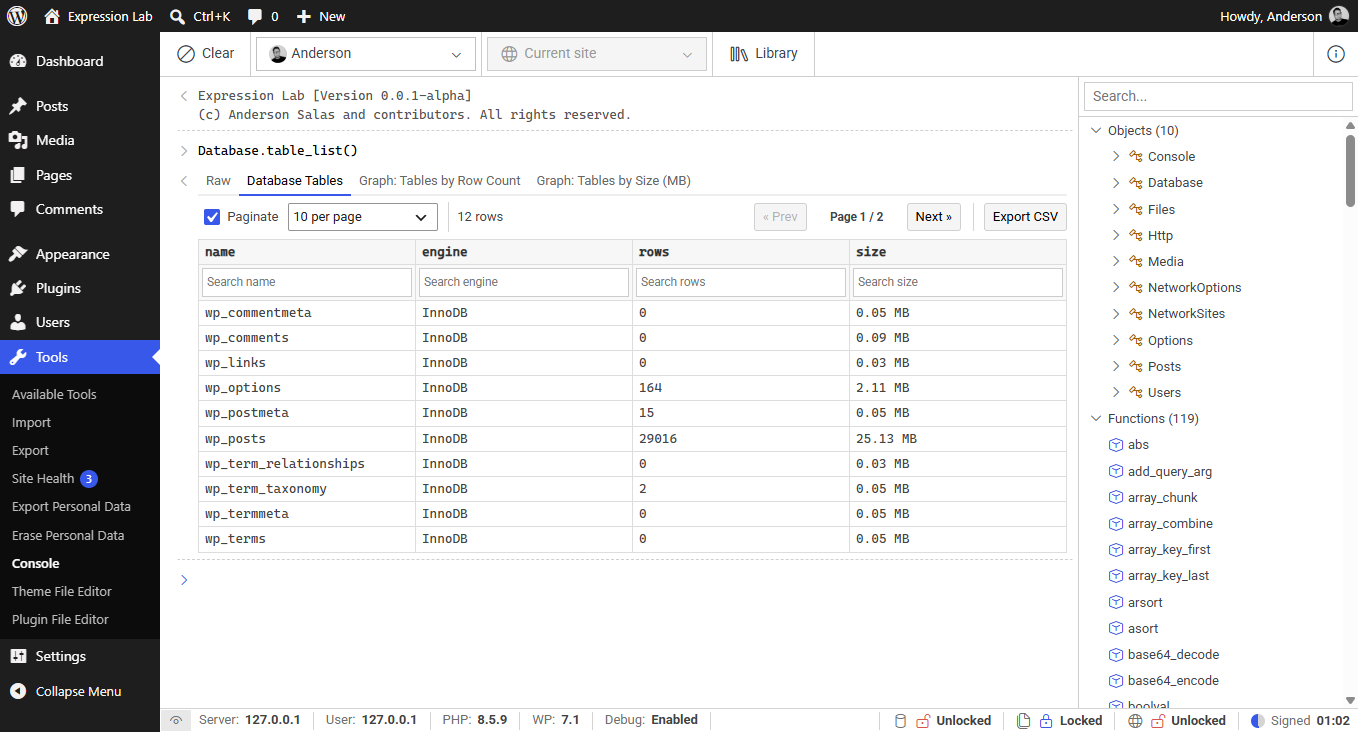
Database.table_list()
Returns metadata for all tables in the active WordPress database (table name, storage engine, row count, and size in MB).
Database.table_list(): array
Return format: An array of objects, each containing:
| Field | Type | Description |
|---|---|---|
name | string | Full table name including prefix |
engine | string | Storage engine (e.g., InnoDB, MyISAM) |
rows | int | Approximate row count |
size | string | Approximate size in MB (e.g., "1.52 MB") |
Database.table_list()
Database.table_details()
Returns column definitions, data types, nullability, default values, and index definitions for a specified WordPress table.
Database.table_details(string:tableName): array
tableName(string, required): Name of the table without prefix (e.g.,'posts','users').
Return format: An object containing two arrays:
| Field | Description |
|---|---|
columns | Result of SHOW FULL COLUMNS FROM tableName - includes Field, Type, Null, Key, Default, Extra, Collation, Privileges, and Comment |
indexes | Result of SHOW INDEXES FROM tableName - includes Key_name, Column_name, Non_unique, Seq_in_index, Cardinality, and more |
Database.table_details('posts')
Database.table_details('usermeta')